

Manette
Game controllers, and a menu to start games.
Connect a controller
Section titled “Connect a controller”Plug it in, or pair it over Bluetooth. A pill at the bottom of the screen says it’s connected.

Xbox, PlayStation, Switch and Steam controllers work, and any other pad Linux recognises. For an Xbox controller over USB, restart once after installing coucou-shell.
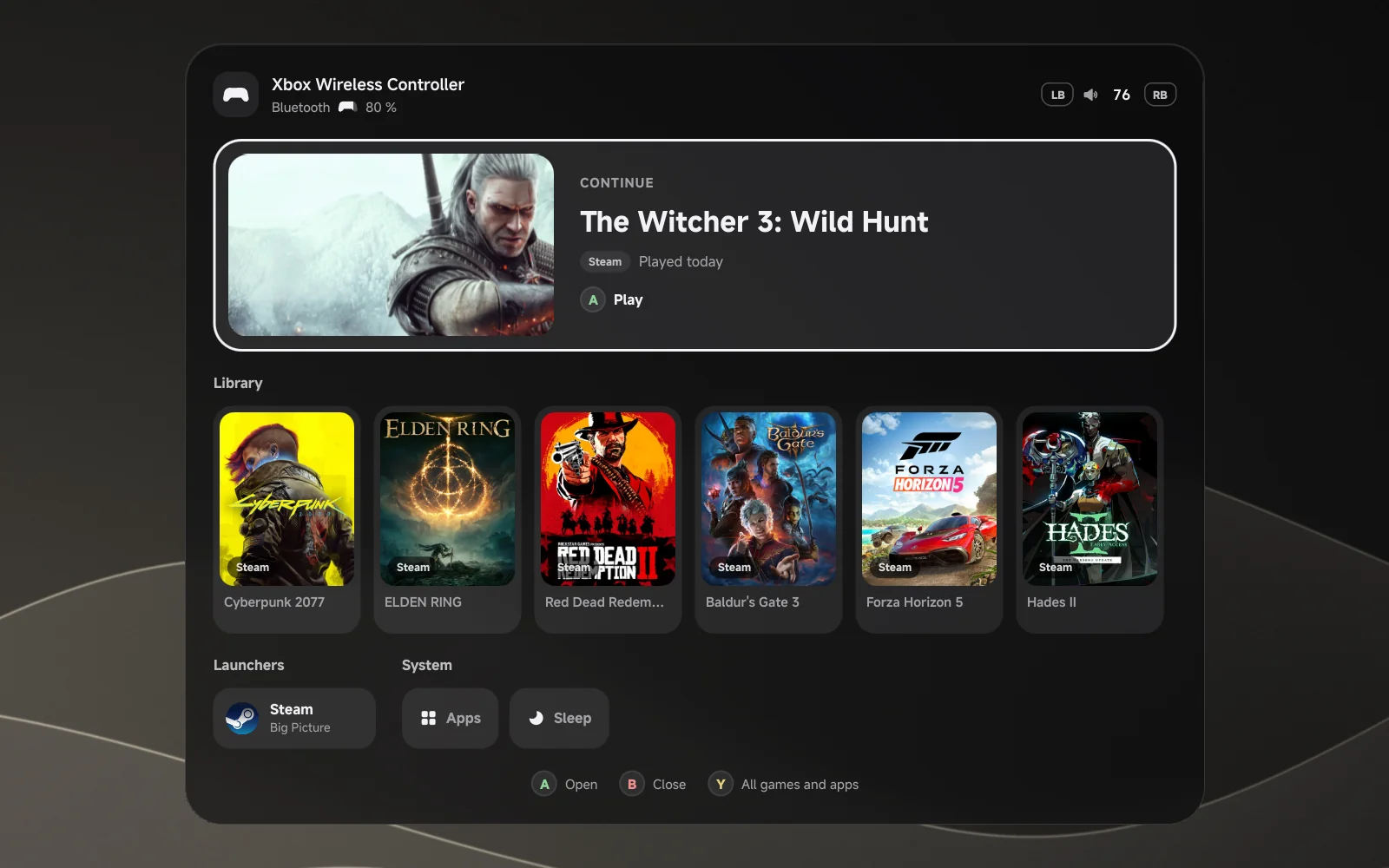
The menu
Section titled “The menu”Press the Guide button (the Xbox, PS or Home logo).
| Row | What it holds |
|---|---|
| Continue | The game played last, with its artwork |
| Library | The other games, Steam and Lutris together, and the games another launcher (Heroic, Bottles, itch…) put in the applications menu |
| Launchers | Steam (in Big Picture), Lutris, Heroic, Bottles, itch: the ones installed |
| System | Apps, Sleep, and Turn off for a Bluetooth controller |
 |
 |
| With an Xbox controller | With a PlayStation controller, charging |
The top button opens every app and game in a grid, with a tab for each source.

Steam and Lutris come with the games unit.
Buttons
Section titled “Buttons”The menu shows the controller’s own buttons: letters in their colours on an Xbox pad, the four shapes on a PlayStation one, dots on a pad it doesn’t know.
| Button | In the menu |
|---|---|
| D-pad, left stick | Move |
Bottom button (A on Xbox, ✕ on PlayStation, B on Switch) |
Open |
Right button (B, ○, A on Switch) |
Back, or close |
Top button (Y, △, X on Switch) |
All apps and games |
Left button (X, □, Y on Switch) |
In the grid, next letter |
Shoulder buttons (LB RB, L1 R1, L R) |
Volume down, up |
Triggers (LT RT, L2 R2, ZL ZR) |
In the grid, previous and next tab |
| Guide | Close |
The keyboard and the mouse work in the menu too: arrows, Return, Esc.
Over a game
Section titled “Over a game”| Situation | Do |
|---|---|
| Over Steam or a fullscreen game | Hold Guide to open the menu. A short press goes to the game |
| A controller without a Guide button | Hold Select + Start |
| Steam reacts to Guide outside a game | Turn off Guide button focuses Steam in Steam’s controller settings |
| In Antenne | The controller drives Antenne while it’s in front. Guide still opens the menu |
In the bar
Section titled “In the bar”While a controller is connected, its silhouette sits in the bar’s right-hand group and fills up like a battery gauge: green while charging, red under 15 %. A wired controller that reports no battery is an outline.
 |
 |
| On battery | Charging |
Without a controller
Section titled “Without a controller”To open the menu from a key or a script:
qs -c bar ipc call bar controllerMenuTo see it without owning that controller:
qs -c bar ipc call controller pad xbox 80 false # or playstation; then its battery, and whether it chargesqs -c bar ipc call controller reset # remove it