

Mixer and equalizer
Output and input levels, the audio devices, and a volume and an equalizer for each app.
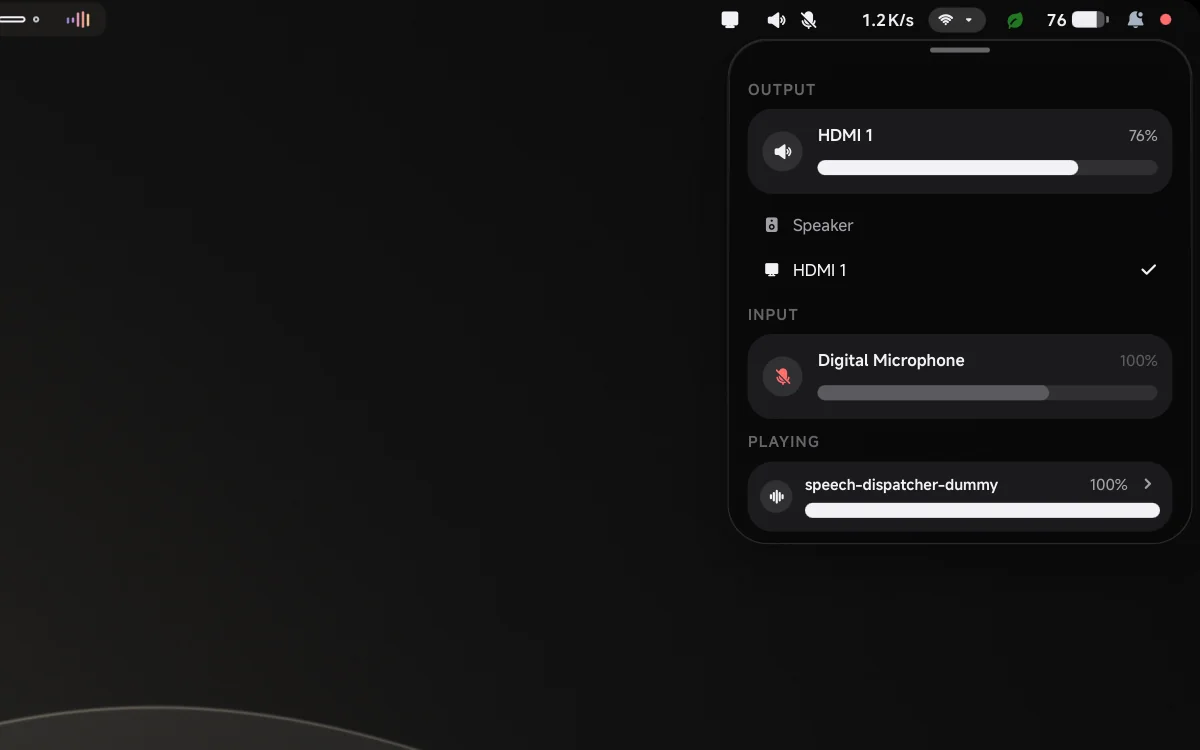
Open it
Section titled “Open it”Click the speaker or the microphone icon, in the right-hand group of the bar.
| On an audio icon | Does |
|---|---|
| Click | Opens the mixer |
| Scroll | Changes the level |
| Right-click | Opens pavucontrol, for card profiles and moving a stream to another device |
A newly plugged output or input becomes the default.
Equalizer
Section titled “Equalizer”Each app has its own. Click the chevron on an app’s row:
- five bands: 60 Hz, 250 Hz, 1 kHz, 4 kHz and 12 kHz;
- ten presets: Flat, Acoustic, Bass boost, Classical, Dance, Hip-hop, Jazz, Pop, Rock and Vocal;
- an on/off switch.
Four apps can have an equalizer at the same time.
Each app keeps its curve. To start again from flat everywhere, delete ~/.local/state/bar-equalizer.json.
Volume keys
Section titled “Volume keys”The volume keys move in 5 % steps and stop at 100 %. A dial shows the level: see indicators.
Change the bands
Section titled “Change the bands”See audio.