

cc-pkg-mng
This is coucou-shell’s own package manager. It installs the parts of coucou-shell, keeps them up to date, and moves between releases. For the very first install, start with installation.md.
Everyday use
Section titled “Everyday use”cc-pkg-mng upgrade # move to the latest release (or the latest commit, on edge) and apply itcc-pkg-mng status # what's installed, and whether it's in placeAn install or an upgrade shows its plan, waits for an OK, then works through four phases on a rail:
| Phase | What happens |
|---|---|
| check | The repositories are ready, and the release’s packages are published |
| download | Every package is resolved and downloaded |
| packages | cc-pkg-mng itself first, when the release has a newer one, then the rest |
| units | The checkout moves to the new version, then each unit is applied |
Nothing a session runs changes before the units phase. A failure up to there leaves the machine on the release it had. A unit that fails in the units phase is named on the closing line, and the next upgrade finishes it.
After an upgrade, the services of the apps whose package changed restart. A new Quickshell restarts the bar. A new Hyprland runs from the next login, and the closing line says so.
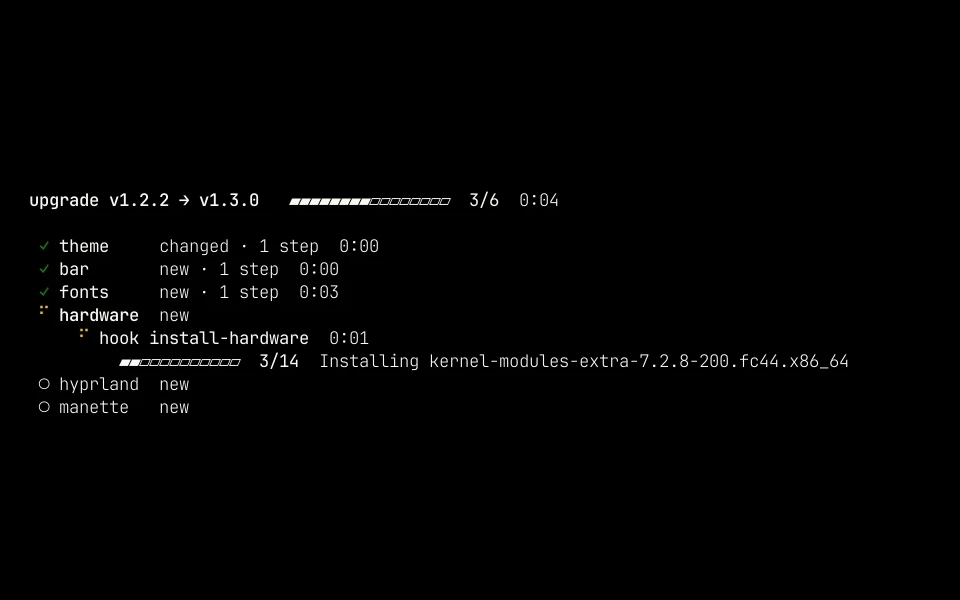
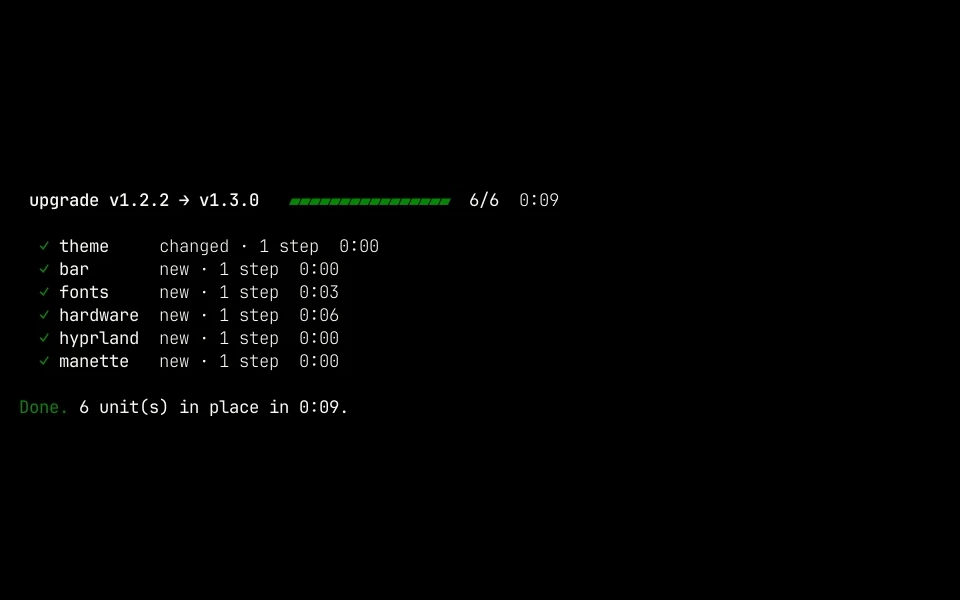
In a pipe, with --verbose or with -q, the output is one line per step. The full log is in ~/.local/state/coucou-shell/logs/.
When packages are in the way
Section titled “When packages are in the way”| Closing line | Meaning |
|---|---|
| vX.Y.Z is tagged but not published yet | The release’s packages aren’t in the repository yet. Run upgrade again later |
| Packages block vX.Y.Z | dnf can’t install the release next to a package already there. Its reasons are listed. On a terminal, cc-pkg-mng names the packages dnf would remove and asks first. --allow-erasing lets dnf remove them without asking |
| The repositories can’t be reached | No network, or a repository is down |
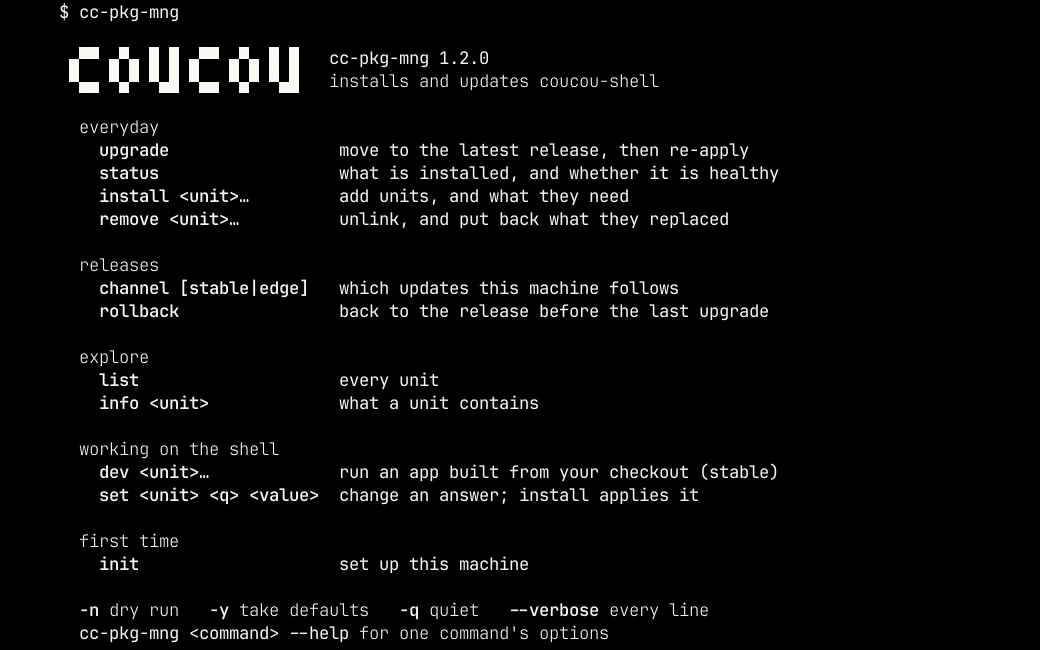
cc-pkg-mng alone, or --help, lists the commands by what they are for:
Units and layers
Section titled “Units and layers”coucou-shell is split into units, grouped in three layers:
| Layer | What’s in it | When it’s installed |
|---|---|---|
| core | The shell itself: Hyprland, the bar, Roue, Prisme, Balise, Manette, Sésame, Liseuse, fonts, theme, drivers | Always. The login screen, the boot splash and Programme are optional |
| apps | Default applications: WezTerm, Firefox, Nemo, Neovim, mpv, and a few extras | Only the ones picked. Any of them can be swapped for another app |
| configs | The author’s setups for the shell, WezTerm, Neovim and a few apps | Only when adopted |
cc-pkg-mng list shows every unit, and cc-pkg-mng info <unit> shows what one contains. The units page lists them all, with their guides.
Commands
Section titled “Commands”| Command | What it does |
|---|---|
init |
Sets up the machine: the checkout, the channel and the units. See installation.md |
list |
Lists every unit by layer, with ● next to the installed ones. Takes --installed and --layer core|apps|configs |
info <unit> |
Shows what a unit installs, links and runs, and which units it needs |
install <unit>… |
Installs units, along with any units they need |
remove <unit>… |
Removes units: unlinks their files, restores what they replaced, and turns their services off. Their packages stay installed |
status |
Shows the release, the channel and the checkout. When something is off: packages behind the release, an upgrade that stopped half-way, units not applied or with broken links, and the command that fixes it |
upgrade |
Moves to the latest release (stable) or the latest commit (edge), then applies whatever changed. --to vX.Y.Z picks a specific release. Already there, it finishes what a stopped upgrade left |
rollback |
Goes back to the release in place before the last upgrade (stable only) |
channel [stable|edge] |
Shows the current channel, or switches to another one. The next upgrade follows it |
dev [<unit>…] |
Runs one of coucou-shell’s own apps built from the current checkout (stable only). With no unit, shows what is running. --off goes back to the release’s, --from <path> builds from another checkout. See testing your changes |
set <unit> <question> <value> |
Changes an answer, for example set wezterm variant smear. Run install wezterm afterwards to apply it |
Options
Section titled “Options”| Flag | Effect |
|---|---|
-n, --dry-run |
Show the plan without changing anything |
-y, --yes |
Accept every default: no questions, no confirmation |
--dir <path> |
Use this coucou-shell checkout. It’s remembered for next time |
-q, --quiet |
Only print warnings and errors |
--verbose |
Show the output of every command as it runs |
--allow-erasing |
Let dnf remove or replace packages that block the transaction |
--no-color |
Plain output, no colours |
--version |
The release this machine runs, its channel and checkout, the manager’s version, the packages and units, the apps running from a checkout, and the latest release |
-V |
The manager’s version alone, on one line |
Channels
Section titled “Channels”| Channel | Follows | coucou-shell’s own apps |
|---|---|---|
| stable | releases (v1.0.0 and so on) |
Installed from coucou-shell’s repository, at the version that matches the release |
| edge | every commit on the default branch | Built on the machine into ~/.local/bin, and rebuilt whenever their code changes. The Rust toolchain is installed for this |
The own apps are Roue, Prisme, Balise, Manette, Sésame, Pouls and Programme.
Testing changes on stable
Section titled “Testing changes on stable”To work on one of coucou-shell’s own apps while staying on stable, code in a second checkout (~/code/dotfiles, on master). From that checkout:
cc-pkg-mng dev roue # build Roue from here, and run it instead of the release'scc-pkg-mng dev # what is running instead of the releasecc-pkg-mng dev --off # back to the release's apps- Shortcuts and the bar use the new build at once.
- Run
devagain after each change. The first build takes a minute or two, the next ones a few seconds. - An
installorupgradethat touches the unit puts the release’s version back. statuslists the dev builds that are running.
On edge, cc-pkg-mng install roue rebuilds what changed.
What each release changed is in the changelog.
What to expect
Section titled “What to expect”- A command that changes the machine shows its plan and waits for an OK. The password is asked once.
- One command changes the machine at a time. A second one stops and says which one is running.
- A unit whose files haven’t changed is skipped.
- A user file that a unit replaces goes to the backups.
removeputs it back. upgradeandrollbackstop when a file of the checkout has changed, and list the files. See keep a change through an upgrade.- The bar reloads itself, and the sound cuts out for a moment when the audio configuration changes. Other running programs keep their old version until they restart.
sudo dnf upgradeupdates coucou-shell’s own apps too. Runcc-pkg-mng upgradeafterwards to bring the rest to the same release.
Everything the manager keeps track of is in ~/.local/state/coucou-shell/:
| Path | Contents |
|---|---|
state.toml |
The checkout, the channel, the version, an upgrade under way, and each installed unit with its answers |
lock |
Held while a command changes the machine |
dev/ |
The dev builds running in place of the release’s, and where each came from |
backups/ |
Files that units replaced, sorted by date |
logs/ |
The full output of every run |
Exit codes
Section titled “Exit codes”0 when everything went fine. 1 for any error, such as a step that failed, a cancelled plan, a unit that doesn’t exist, uncommitted changes in the way, or another cc-pkg-mng running.